
Popular Products


iPhone USB-C 60W Charger Cable-1m
iPhone USB-C 60W Charger Cable-1m Brand: Apple Model: USB-C Charge Cable (1m) Power Output: 60W Cable Length: 1 meter Connector Type: USB-C Data Transfer Speed: USB 2.0 Color: Pumpkin Orange,White Fast Charging Orange 60W PD Type-C to Type-C Nylon Braided Cable – 1m Compatible...
- from BDT 790
BDT 1,500- from BDT 790
- Unit price
- / per
Save BDT 710
-
Orange
-
White


iPhone 14 Pro Max 20W USB-C Power Adapter USB-C to Lightning Cable
iPhone 14 Pro Max 20W USB-C Power Adapter USB-C to Lightning Cable What’s in the Box Apple 20W USB‑C Power Adapter USB-C to Lightning Cable Tech Specs Connector Type: USB‑C Output Power: 20W Apple 20W USB‑C Power Adapter – Fast Charging Made Simple Overview...
- from BDT 790
BDT 1,500- from BDT 790
- Unit price
- / per
Save BDT 710


iPhone 14Pro Max 20W USB-C Power Adapter USB-C to Lightning Cable
iPhone 14Pro Max 20W USB-C Power Adapter USB-C to Lightning Cable Apple 20W USB-C Power Adapter – Specifications Brand: Apple Model: 20W USB-C Power Adapter Power Output: 20W Fast Charging Warranty: 1 Year Brand Warranty Plug Type: 3-Pin Charging Cable: Yes Compatibility: iPhone, iPad, AirPods,...
- from BDT 790
BDT 1,500- from BDT 790
- Unit price
- / per
Save BDT 710

- Home
-
-
- Power Bank
- Go to Power Bank
- Baseus
-
- Phones
- Go to Phones
-
Feature Phones
- Feature Phones
- Go to Feature Phones
- Nokia
- Samsung
-
- Adapters & Chargers
- Go to Adapters & Chargers
- Apple
- Samsung
- One plus
- Google Pixel
- Anker
- Wireless Chargers
-
- Kitchen Appliances
- Go to Kitchen Appliances
-
Electric Stove
- Electric Stove
- Go to Electric Stove
- Miyako
- Contact US
- Blogs
- My Wish List
- My Account
Sale
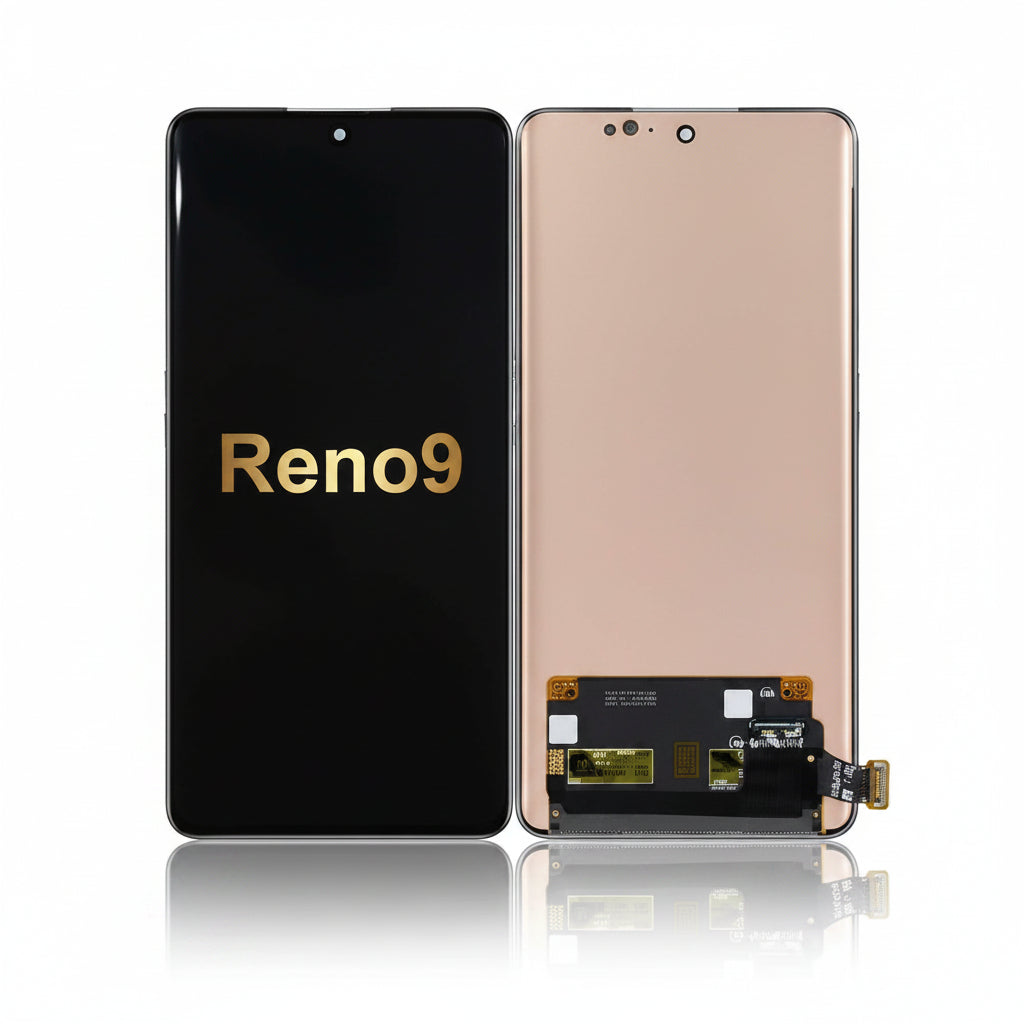
Oppo Reno 9 Display Price in Bangladesh
- BDT 8,390
BDT 10,000- BDT 8,390
- Unit price
- / per
Save BDT 1,610
No reviews
2
sold in last
8
hours
10 customers are viewing this product
Order Soon! ⏳
Next cutoff in
Estimated Delivery
Cut-off Time
2:00 PM Daily
Orders placed after cutoff will be processed next business day
Oppo Reno 9 Display Price in Bangladesh Display Type: AMOLED Display Size: 6.7 inches Resolution: 1080 × 2412 pixels Protection: Asahi Glass AGC DT‑Star2 Condition: New — brand‑new, unused Originality: 100% Original Product Service Charge: 300tk (if replaced at our shop) Installation Tips:- Test the display's functionality before installation.- Be...
Please hurry! Only 0 left in stock
Description
xOppo Reno 9 Display Price in Bangladesh
- Display Type: AMOLED
- Display Size: 6.7 inches
- Resolution: 1080 × 2412 pixels
- Protection: Asahi Glass AGC DT‑Star2
- Condition: New — brand‑new, unused
- Originality: 100% Original Product
- Service Charge: 300tk (if replaced at our shop)
Installation Tips:
- Test the display's functionality before installation.
- Be careful not to damage the socket or nearby components on the board.
- The screws are of different sizes; avoid over-tightening or forcing them.
Display Installation:
1. Before installing the Oppo Reno 9 display, ensure that the poly paper has not been torn or opened. If there’s any defect or issue, contact wefixfast before installation.
2. Inspect both the top and bottom sides of the display without removing any protective film. If everything looks fine, proceed with installation; if there’s an issue, do not install.
3. Handle the display carefully during installation to avoid any damage.
4. Once you are 100% certain everything is in order, remove the protective film or sticker and install the display.
5. Removing any protective film or paper from both sides of the display will void the warranty.
6. Any contact with sweat or adhesive will void the warranty.
7. Ensure that the display's original colors and touch functionality work properly before installation.
Available Now:
- Oppo Reno 9 battery and Back Panel in all colors—check them out now!
All Oppo Reno phone parts are available at wefixfast.
Return & Exchange Policy
xReturn & Exchange Policy
We want our customers to have a smooth shopping experience. Please read our return and exchange policy carefully.If you face any problem with the product within 7 days of receiving it, we will provide a replacement/exchange. Cash refunds are not available. Products eligible for return will only be exchanged with the same product or an equivalent replacement.
Conditions for Exchange
The product must be returned within 7 days of delivery. The product must not be physically damaged, broken, or misused. Original packaging and accessories (if any) should be included. A proper unboxing video may be required for verification of any issue.
Exchange Will Not Be Accepted If
The product has been damaged by the customer. The issue is reported after 7 days. The product is returned without necessary proof of purchase
Customer Support
For any exchange request, please contact our support team with your order details and a description of the problem.
Warranty Claim Requirements
xTo claim warranty service, customers must provide all of the following:
Original product box
Original packaging
Warranty card (if applicable)
Proof of purchase (invoice/order confirmation, if requested)
Warranty claims will not be accepted if any of the required items are missing.
Related Products
Example product title
- from BDT 5,290
BDT 7,000- from BDT 5,290
- Unit price
- / per
Save BDT 1,710
Example product title
- from BDT 5,290
BDT 7,000- from BDT 5,290
- Unit price
- / per
Save BDT 1,710
Example product title
- from BDT 5,290
BDT 7,000- from BDT 5,290
- Unit price
- / per
Save BDT 1,710
Example product title
- from BDT 5,290
BDT 7,000- from BDT 5,290
- Unit price
- / per
Save BDT 1,710
Example product title
- from BDT 5,290
BDT 7,000- from BDT 5,290
- Unit price
- / per
Save BDT 1,710
Example product title
- from BDT 5,290
BDT 7,000- from BDT 5,290
- Unit price
- / per
Save BDT 1,710
Example product title
- from BDT 5,290
BDT 7,000- from BDT 5,290
- Unit price
- / per
Save BDT 1,710
Example product title
- from BDT 5,290
BDT 7,000- from BDT 5,290
- Unit price
- / per
Save BDT 1,710
Example product title
- from BDT 5,290
BDT 7,000- from BDT 5,290
- Unit price
- / per
Save BDT 1,710
Example product title
- from BDT 5,290
BDT 7,000- from BDT 5,290
- Unit price
- / per
Save BDT 1,710
Recently Viewed Products
Example product title
- from BDT 5,290
BDT 7,000- from BDT 5,290
- Unit price
- / per
Save BDT 1,710
Example product title
- from BDT 5,290
BDT 7,000- from BDT 5,290
- Unit price
- / per
Save BDT 1,710
Example product title
- from BDT 5,290
BDT 7,000- from BDT 5,290
- Unit price
- / per
Save BDT 1,710
Example product title
- from BDT 5,290
BDT 7,000- from BDT 5,290
- Unit price
- / per
Save BDT 1,710
Example product title
- from BDT 5,290
BDT 7,000- from BDT 5,290
- Unit price
- / per
Save BDT 1,710
Example product title
- from BDT 5,290
BDT 7,000- from BDT 5,290
- Unit price
- / per
Save BDT 1,710
Example product title
- from BDT 5,290
BDT 7,000- from BDT 5,290
- Unit price
- / per
Save BDT 1,710
Example product title
- from BDT 5,290
BDT 7,000- from BDT 5,290
- Unit price
- / per
Save BDT 1,710
Example product title
- from BDT 5,290
BDT 7,000- from BDT 5,290
- Unit price
- / per
Save BDT 1,710
Example product title
- from BDT 5,290
BDT 7,000- from BDT 5,290
- Unit price
- / per
Save BDT 1,710
- Choosing a selection results in a full page refresh.