
Popular Products


33% Off

36% Off


- Home
-
-
-
- Power Bank
- Go to Power Bank
- Baseus
-
- Headphones & Headsets
- Go to Headphones & Headsets
-
Over-the-Ear Headphones
- Over-the-Ear Headphones
- Go to Over-the-Ear Headphones
- Oraimo
-
- Home Appliances
- Go to Home Appliances
-
Electric Stove
- Electric Stove
- Go to Electric Stove
- Miyako
-
Electric Fly Swatters
- Electric Fly Swatters
- Go to Electric Fly Swatters
- HELIX - Fly Bye Series
- Robot Vacuums
- Charger separator
- Contact US
- Blogs
- My Wish List
- My Account
Sale
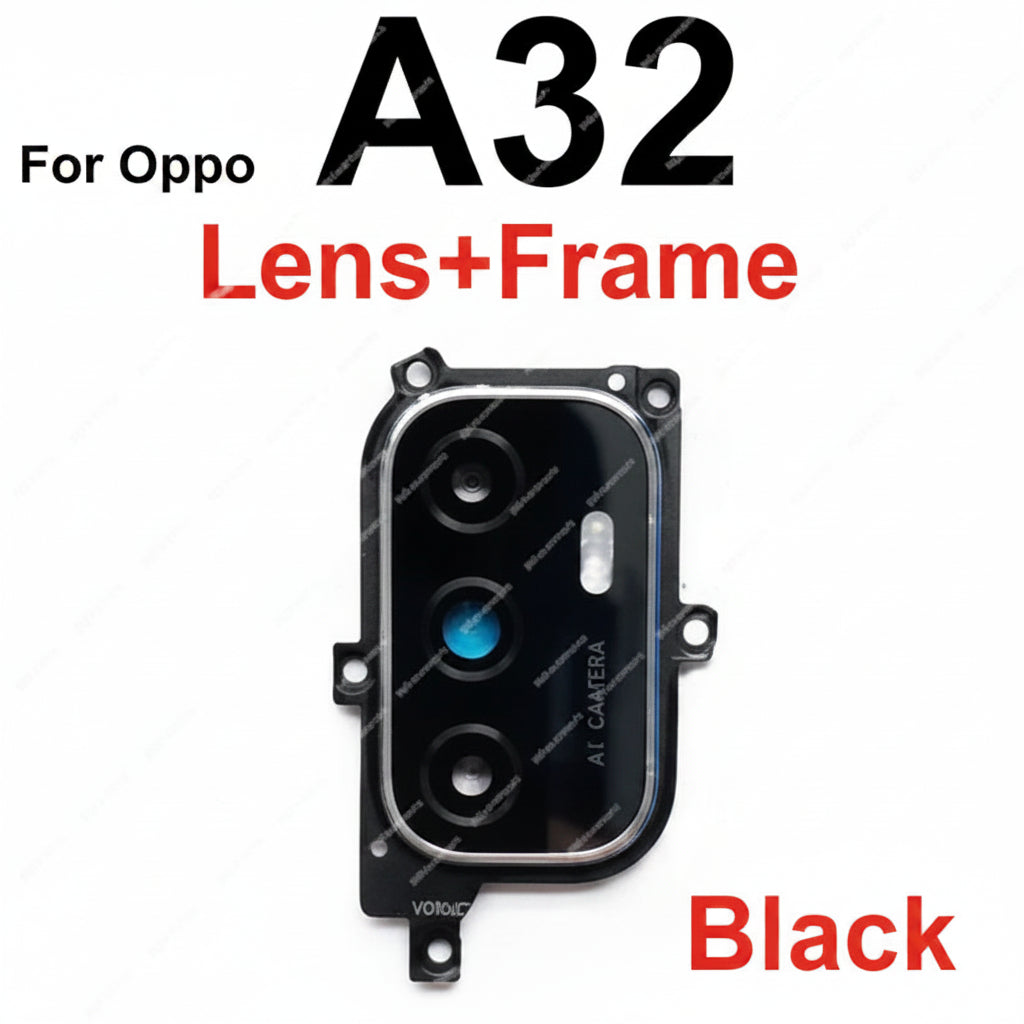
Oppo A32 camera glass lens price in Bangladesh
- 290 BDT
350 BDT- 290 BDT
- (-53%)
- Unit price
- / per
Save BDT 60
2
sold in last
8
hours
10 customers are viewing this product
Order Soon! ⏳
Next cutoff in
Estimated Delivery
Cut-off Time
2:00 PM Daily
Orders placed after cutoff will be processed next business day
Oppo A32 camera glass lens price in Bangladesh Condition: Brand‑New Type: Camera Glass Compatible Brand: For Oppo Compatible Model: For Oppo A32 Delivery: Available only in Bangladesh Solve Common Issues: - Fix Scratches or Breaks: - Ideal for replacing damaged or cracked camera glass. - Improve Photo Quality: - Replace...
Please hurry! Only 0 left in stock
Description
xOppo A32 camera glass lens price in Bangladesh
- Condition: Brand‑New
- Type: Camera Glass
- Compatible Brand: For Oppo
- Compatible Model: For Oppo A32
- Delivery: Available only in Bangladesh
Solve Common Issues:
- Fix Scratches or Breaks:
- Ideal for replacing damaged or cracked camera glass.
- Improve Photo Quality:
- Replace the lens if your photos appear fuzzy or unclear.
Installation Instructions:
1. Remove Broken Glass:
- Carefully remove any broken glass fragments from the camera area.
2. Clean the Surface:
- Clean the area to ensure a smooth and clean attachment.
3. Attach the New Lens:
- Use double-sided tape or a couple of drops of glue to secure the new lens.
4. Handle with Care:
- Be cautious during the repair to avoid touching the camera itself.
Safety Tip:
- Wear eye protection to prevent any flying glass fragments from causing injury during the repair process.
Restore the clarity of your Oppo A32 camera with a brand new lens from wefixfast today!
Return & Exchange Policy
xReturn & Exchange Policy
We want our customers to have a smooth shopping experience. Please read our return and exchange policy carefully.If you face any problem with the product within 7 days of receiving it, we will provide a replacement/exchange. Cash refunds are not available. Products eligible for return will only be exchanged with the same product or an equivalent replacement.
Conditions for Exchange
The product must be returned within 7 days of delivery. The product must not be physically damaged, broken, or misused. Original packaging and accessories (if any) should be included. A proper unboxing video may be required for verification of any issue.
Exchange Will Not Be Accepted If
The product has been damaged by the customer. The issue is reported after 7 days. The product is returned without necessary proof of purchase
Customer Support
For any exchange request, please contact our support team with your order details and a description of the problem.
Warranty Claim Requirements
xTo claim warranty service, customers must provide all of the following:
Original product box
Original packaging
Warranty card (if applicable)
Proof of purchase (invoice/order confirmation, if requested)
Warranty claims will not be accepted if any of the required items are missing.
- More Products:
- Xiaomi Poco M4 Pro Camera Glass Lens price in BD
- Xiaomi Poco F4 Camera Glass Lens price in BD
- Samsung Galaxy S21 FE 5G Rear Camera Glass Lens Price in Bangladesh
- Infinix Hot 20S camera lens glass price in BD
- Realme X2 Pro Camera Glass Lens Price in BD
- Xiaomi Mi A2 Rear Facing Camera Glass Lens price in BD
Related Products
Example product title
- from 190 BDT
350 BDT- from 190 BDT
- (-53%)
- Unit price
- / per
Save BDT 160
Example product title
- from 190 BDT
350 BDT- from 190 BDT
- (-53%)
- Unit price
- / per
Save BDT 160
Example product title
- from 190 BDT
350 BDT- from 190 BDT
- (-53%)
- Unit price
- / per
Save BDT 160
Example product title
- from 190 BDT
350 BDT- from 190 BDT
- (-53%)
- Unit price
- / per
Save BDT 160
Example product title
- from 190 BDT
350 BDT- from 190 BDT
- (-53%)
- Unit price
- / per
Save BDT 160
Example product title
- from 190 BDT
350 BDT- from 190 BDT
- (-53%)
- Unit price
- / per
Save BDT 160
Example product title
- from 190 BDT
350 BDT- from 190 BDT
- (-53%)
- Unit price
- / per
Save BDT 160
Example product title
- from 190 BDT
350 BDT- from 190 BDT
- (-53%)
- Unit price
- / per
Save BDT 160
Example product title
- from 190 BDT
350 BDT- from 190 BDT
- (-53%)
- Unit price
- / per
Save BDT 160
Example product title
- from 190 BDT
350 BDT- from 190 BDT
- (-53%)
- Unit price
- / per
Save BDT 160
Recently Viewed Products
Example product title
- from 190 BDT
350 BDT- from 190 BDT
- (-53%)
- Unit price
- / per
Save BDT 160
Example product title
- from 190 BDT
350 BDT- from 190 BDT
- (-53%)
- Unit price
- / per
Save BDT 160
Example product title
- from 190 BDT
350 BDT- from 190 BDT
- (-53%)
- Unit price
- / per
Save BDT 160
Example product title
- from 190 BDT
350 BDT- from 190 BDT
- (-53%)
- Unit price
- / per
Save BDT 160
Example product title
- from 190 BDT
350 BDT- from 190 BDT
- (-53%)
- Unit price
- / per
Save BDT 160
Example product title
- from 190 BDT
350 BDT- from 190 BDT
- (-53%)
- Unit price
- / per
Save BDT 160
Example product title
- from 190 BDT
350 BDT- from 190 BDT
- (-53%)
- Unit price
- / per
Save BDT 160
Example product title
- from 190 BDT
350 BDT- from 190 BDT
- (-53%)
- Unit price
- / per
Save BDT 160
Example product title
- from 190 BDT
350 BDT- from 190 BDT
- (-53%)
- Unit price
- / per
Save BDT 160
Example product title
- from 190 BDT
350 BDT- from 190 BDT
- (-53%)
- Unit price
- / per
Save BDT 160
- Choosing a selection results in a full page refresh.