
Popular Products


iPhone 14 Pro Max 25W charger
iPhone 14 Pro Max 25W charger What’s in the Box Apple 25W USB‑C Power Adapter USB-C to Lightning Cable Tech Specs Connector Type: USB‑C Output Power: 25W iphone 14 Pro Max charger price in bangladesh Overview The iPhone 14 Pro Max 25W charger delivers fast,...
- from 1,490 BDT
1,690 BDT- from 1,490 BDT
- (-30%)
- Unit price
- / per
Save BDT 200

iPhone X Power Button Flex Cable Ribbon Replacement in bangladesh
iPhone X Power Button Flex Cable Ribbon Replacement in bangladesh Replace your damaged or malfunctioning power button flex cable ribbon with this high-quality, durable part for the Apple iPhone X. Ensure your device functions like new with a genuine replacement. Product Features:- Compatibility: Designed...
- from 1,290 BDT
1,600 BDT- from 1,290 BDT
- (-38%)
- Unit price
- / per
Save BDT 310

iPhone 7 Plus Power Button and Volume Button Flex Cable Ribbon Assembly Replacement
iPhone 7 Plus Power Button and Volume Button Flex Cable Ribbon Assembly Replacement Description: Is your iPhone 7 Plus power or volume button not responding? The issue might be with the flex cable ribbon assembly. Our high-quality replacement part will restore full functionality to...
- from 590 BDT
890 BDT- from 590 BDT
- (-50%)
- Unit price
- / per
Save BDT 300

iPhone 7 Plus Rear Facing Camera Glass Lens Replacement
iPhone 7 Plus Rear Facing Camera Glass Lens Replacement Need a replacement for your iPhone 7 Plus rear camera glass lens? If the lens is cracked or damaged, this is the perfect replacement part to restore your camera's performance and appearance. Why Choose Our...
- from 190 BDT
299 BDT- from 190 BDT
- (-38%)
- Unit price
- / per
Save BDT 109
iPhone 7 Plus Sensor Flex Cable Ribbon with Front Facing Camera Replacement in bangladesh
iPhone 7 Plus Sensor Flex Cable Ribbon with Front Facing Camera Replacement in bangladesh Need a replacement for your iPhone 7 Plus rear camera glass lens? If the lens is cracked or damaged, this is the perfect replacement part to restore your camera's performance...
- from 190 BDT
299 BDT- from 190 BDT
- (-38%)
- Unit price
- / per
Save BDT 109

- Home
-
-
-
-
- Power Bank
- Go to Power Bank
- Baseus
-
- Headphones & Headsets
- Go to Headphones & Headsets
-
Over-the-Ear Headphones
- Over-the-Ear Headphones
- Go to Over-the-Ear Headphones
- Oraimo
-
In-Ear Headphones
- In-Ear Headphones
- Go to In-Ear Headphones
- Apple air pods
- OPPO
-
- Home Appliances
- Go to Home Appliances
-
Electric Stove
- Electric Stove
- Go to Electric Stove
- Miyako
-
Electric Fly Swatters
- Electric Fly Swatters
- Go to Electric Fly Swatters
- HELIX - Fly Bye Series
- Robot Vacuums
- Charger separator
- Contact US
- Blogs
- My Wish List
- My Account
Sale
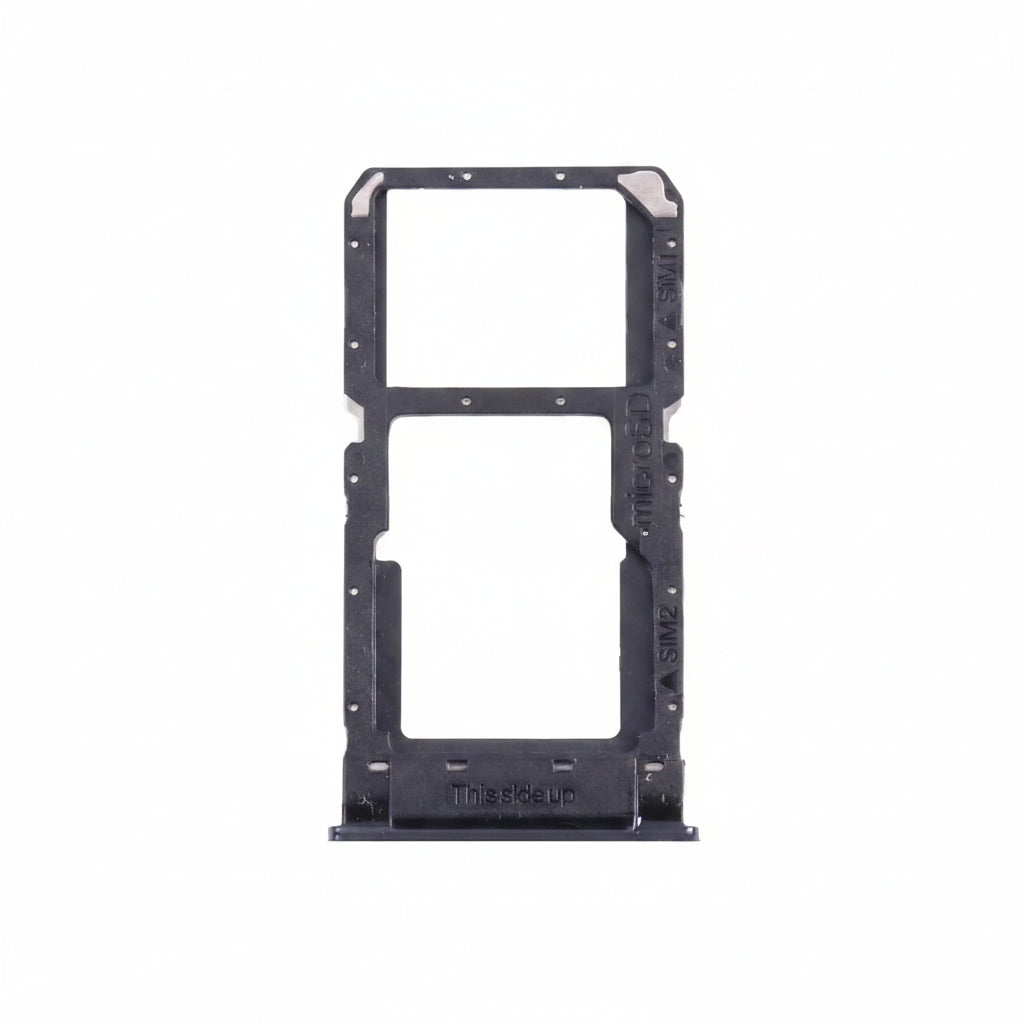
OnePlus Nord N10 SIM card tray price in bd
- 490 BDT
699 BDT- 490 BDT
- (-52%)
- Unit price
- / per
Save BDT 209
2
sold in last
8
hours
10 customers are viewing this product
Order Soon! ⏳
Next cutoff in
Estimated Delivery
Cut-off Time
2:00 PM Daily
Orders placed after cutoff will be processed next business day
OnePlus Nord N10 SIM card tray price in bd Product Specification Condition: New – Brand‑new, unused, unopened, undamaged item in original packaging Type: SIM Tray / SIM Card Tray / SIM Slot Materials: Plastic / Steel Brand: Unbranded Compatible Brand: For OnePlus Compatible Model: For OnePlus Nord N10 Color Options:...
Please hurry! Only 0 left in stock
Description
xOnePlus Nord N10 SIM card tray price in bd
Product Specification
- Condition: New – Brand‑new, unused, unopened, undamaged item in original packaging
- Type: SIM Tray / SIM Card Tray / SIM Slot
- Materials: Plastic / Steel
- Brand: Unbranded
- Compatible Brand: For OnePlus
- Compatible Model: For OnePlus Nord N10
- Color Options: All Colors Available
- Delivery: Only Bangladesh
Estimated Delivery Time:
- Inside Dhaka City: Up to 2 working days.
- Outside Dhaka: Up to 5 working days.
---
Revitalize Your OnePlus Nord N10 with a SIM Card Tray Holder Slot Replacement – Available in All Colors!
The OnePlus Nord N10 is a sleek and high-performing smartphone, but over time, even the best devices can experience wear and tear. One common issue is a malfunctioning SIM card tray holder slot. If you're facing this problem, don't worry! Replacing the SIM card tray holder slot in your preferred color can bring your OnePlus Nord N10 back to life.
Why is the SIM Card Tray Holder Slot Important?
The SIM card tray holder slot plays a critical role in ensuring that your device maintains a connection to the outside world. It securely holds your SIM card, allowing your OnePlus Nord N10 to make calls, send texts, and access data. Without a working tray, your phone will struggle to perform its primary function: communication.
Choose the Right Color
OnePlus Nord N10 offers a variety of colors, allowing you to replace the SIM card tray holder slot to match the original color of your device or choose a fresh new shade. Whether you prefer Midnight Ice, Gray Onyx, or Blue Marble, there’s a color for everyone to personalize your smartphone and give it a fresh look.
Simple DIY Replacement Guide
Replacing the SIM card tray holder slot on your OnePlus Nord N10 is an easy task that you can do yourself with a few simple steps:
1. Gather Your Tools: You will need a SIM card ejector tool and the replacement tray holder slot in your chosen color.
2. Power Off Your Device: Ensure your phone is turned off before starting the repair to avoid any accidental damage.
3. Eject the Old Tray: Use the SIM card ejector tool to gently push into the small hole near the SIM tray. The old tray will pop out.
4. Install the New Tray: Carefully insert the new tray into its slot, ensuring it fits securely.
5. Power On & Test: Turn your OnePlus Nord N10 back on and check that your SIM card is recognized and working.
Benefits of Replacing Your SIM Card Tray Holder Slot
- Restored Functionality: By replacing the tray, you restore your phone’s ability to make calls, send texts, and use mobile data, ensuring your device stays connected.
- Enhanced Aesthetics: Opting for a different color can give your OnePlus Nord N10 a fresh, personalized look, making it feel like a brand-new device.
- Cost-Effective: Replacing the SIM card tray holder slot is a cost-effective solution compared to purchasing a new phone, especially if the rest of your device is in great condition.
If you’re experiencing issues with your OnePlus Nord N10’s SIM card tray holder slot, there’s no need to worry. Replacing it is simple and affordable, and it restores both functionality and style. Choose your desired color, follow the easy steps, and enjoy your device as good as new!
Return & Exchange Policy
xReturn & Exchange Policy
We want our customers to have a smooth shopping experience. Please read our return and exchange policy carefully.If you face any problem with the product within 7 days of receiving it, we will provide a replacement/exchange. Cash refunds are not available. Products eligible for return will only be exchanged with the same product or an equivalent replacement.
Conditions for Exchange
The product must be returned within 7 days of delivery. The product must not be physically damaged, broken, or misused. Original packaging and accessories (if any) should be included. A proper unboxing video may be required for verification of any issue.
Exchange Will Not Be Accepted If
The product has been damaged by the customer. The issue is reported after 7 days. The product is returned without necessary proof of purchase
Customer Support
For any exchange request, please contact our support team with your order details and a description of the problem.
Warranty Claim Requirements
xTo claim warranty service, customers must provide all of the following:
Original product box
Original packaging
Warranty card (if applicable)
Proof of purchase (invoice/order confirmation, if requested)
Warranty claims will not be accepted if any of the required items are missing.
Related Products
Example product title
- from 290 BDT
599 BDT- from 290 BDT
- (-52%)
- Unit price
- / per
Save BDT 309
Example product title
- from 290 BDT
599 BDT- from 290 BDT
- (-52%)
- Unit price
- / per
Save BDT 309
Example product title
- from 290 BDT
599 BDT- from 290 BDT
- (-52%)
- Unit price
- / per
Save BDT 309
Example product title
- from 290 BDT
599 BDT- from 290 BDT
- (-52%)
- Unit price
- / per
Save BDT 309
Example product title
- from 290 BDT
599 BDT- from 290 BDT
- (-52%)
- Unit price
- / per
Save BDT 309
Example product title
- from 290 BDT
599 BDT- from 290 BDT
- (-52%)
- Unit price
- / per
Save BDT 309
Example product title
- from 290 BDT
599 BDT- from 290 BDT
- (-52%)
- Unit price
- / per
Save BDT 309
Example product title
- from 290 BDT
599 BDT- from 290 BDT
- (-52%)
- Unit price
- / per
Save BDT 309
Example product title
- from 290 BDT
599 BDT- from 290 BDT
- (-52%)
- Unit price
- / per
Save BDT 309
Example product title
- from 290 BDT
599 BDT- from 290 BDT
- (-52%)
- Unit price
- / per
Save BDT 309
Recently Viewed Products
Example product title
- from 290 BDT
599 BDT- from 290 BDT
- (-52%)
- Unit price
- / per
Save BDT 309
Example product title
- from 290 BDT
599 BDT- from 290 BDT
- (-52%)
- Unit price
- / per
Save BDT 309
Example product title
- from 290 BDT
599 BDT- from 290 BDT
- (-52%)
- Unit price
- / per
Save BDT 309
Example product title
- from 290 BDT
599 BDT- from 290 BDT
- (-52%)
- Unit price
- / per
Save BDT 309
Example product title
- from 290 BDT
599 BDT- from 290 BDT
- (-52%)
- Unit price
- / per
Save BDT 309
Example product title
- from 290 BDT
599 BDT- from 290 BDT
- (-52%)
- Unit price
- / per
Save BDT 309
Example product title
- from 290 BDT
599 BDT- from 290 BDT
- (-52%)
- Unit price
- / per
Save BDT 309
Example product title
- from 290 BDT
599 BDT- from 290 BDT
- (-52%)
- Unit price
- / per
Save BDT 309
Example product title
- from 290 BDT
599 BDT- from 290 BDT
- (-52%)
- Unit price
- / per
Save BDT 309
Example product title
- from 290 BDT
599 BDT- from 290 BDT
- (-52%)
- Unit price
- / per
Save BDT 309
- Choosing a selection results in a full page refresh.